Blog
What is Model Context Protocol (MCP)?
Model Context Protocol (MCP) is an open standard that connects AI assistants to tools and data sources. How it works, vs RAG, security, and why it matters for focus apps.
 Mil Hoornaert · 11 min read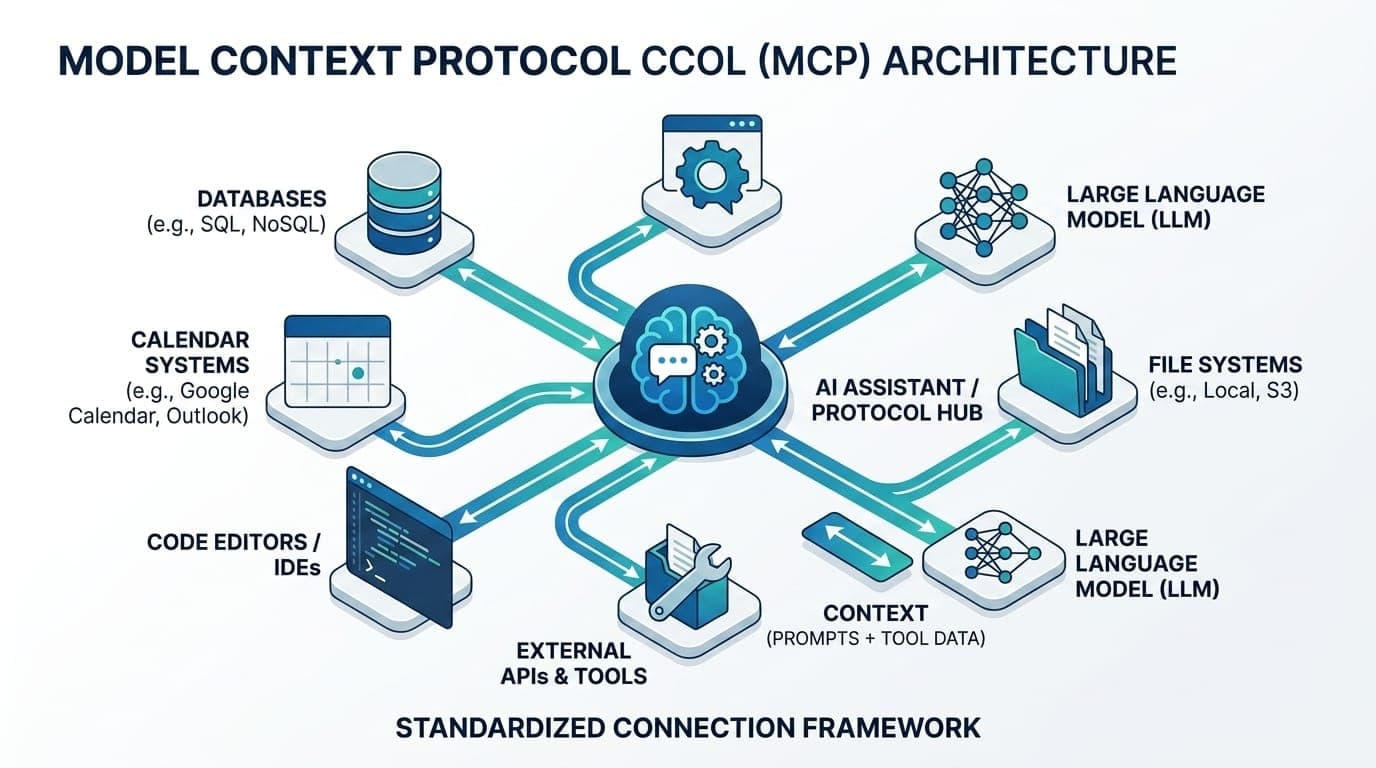
The Model Context Protocol (MCP) is an open standard that connects AI assistants to external data sources, tools, and systems. Introduced by Anthropic in November 2024, the Model Context Protocol provides AI applications like Claude and ChatGPT with access to real-time information, databases, local files, and action capabilities, transforming isolated chatbots into connected productivity agents.
Key takeaways:
- Model Context Protocol is an open-source standard for connecting AI applications to external systems (data sources, tools, workflows)
- MCP solves the "isolation problem" of LLMs by giving them access to current data and the ability to perform tasks
- Uses a client-server architecture with JSON-RPC 2.0 for standardized communication between AI systems and external tools
- Already supported by Claude, ChatGPT, VS Code, Cursor, and other major AI tools
- Enables AI agents to manage calendars, query databases, control system-level tools, and automate workflows
Why the Model Context Protocol Exists
Even the most advanced AI models are fundamentally limited. They only know what was in their training data, which becomes outdated the moment training ends. They can't check your calendar, pull data from your CRM, or update a spreadsheet. Every conversation starts from scratch.
Before the Model Context Protocol, connecting an AI assistant to external systems required custom integrations for each combination of model and data source. Want Claude to access Google Drive? Build a custom connector. Want ChatGPT to query your Postgres database? Write another integration. This creates what engineers call the N × M problem, the number of required connections grows exponentially with every new AI tool or data source.
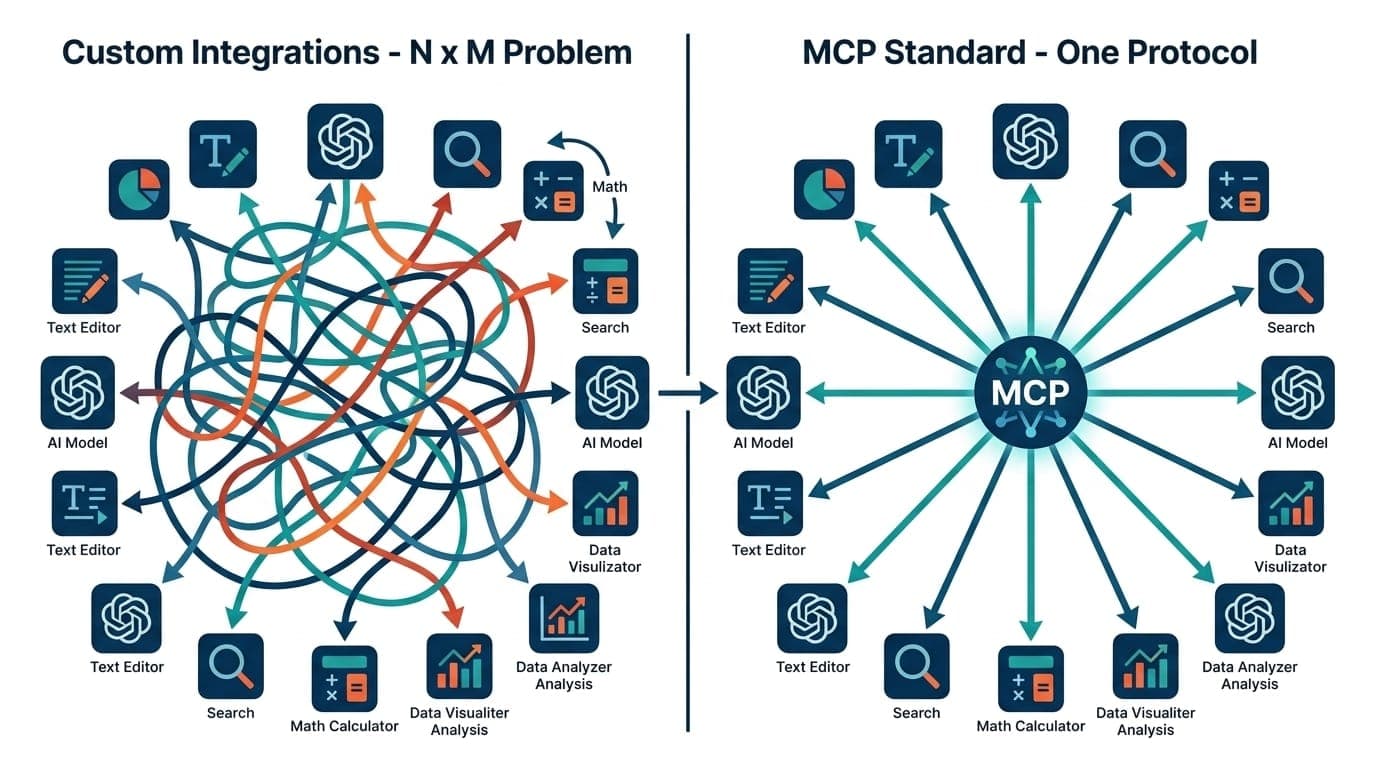
The Model Context Protocol provides a universal, open standard, like USB-C for AI applications. Build one MCP server to expose your data, and any MCP-compatible AI assistant can connect to it. Build one MCP client, and it can access the entire ecosystem of MCP servers.
Understanding the Model Context Protocol Architecture
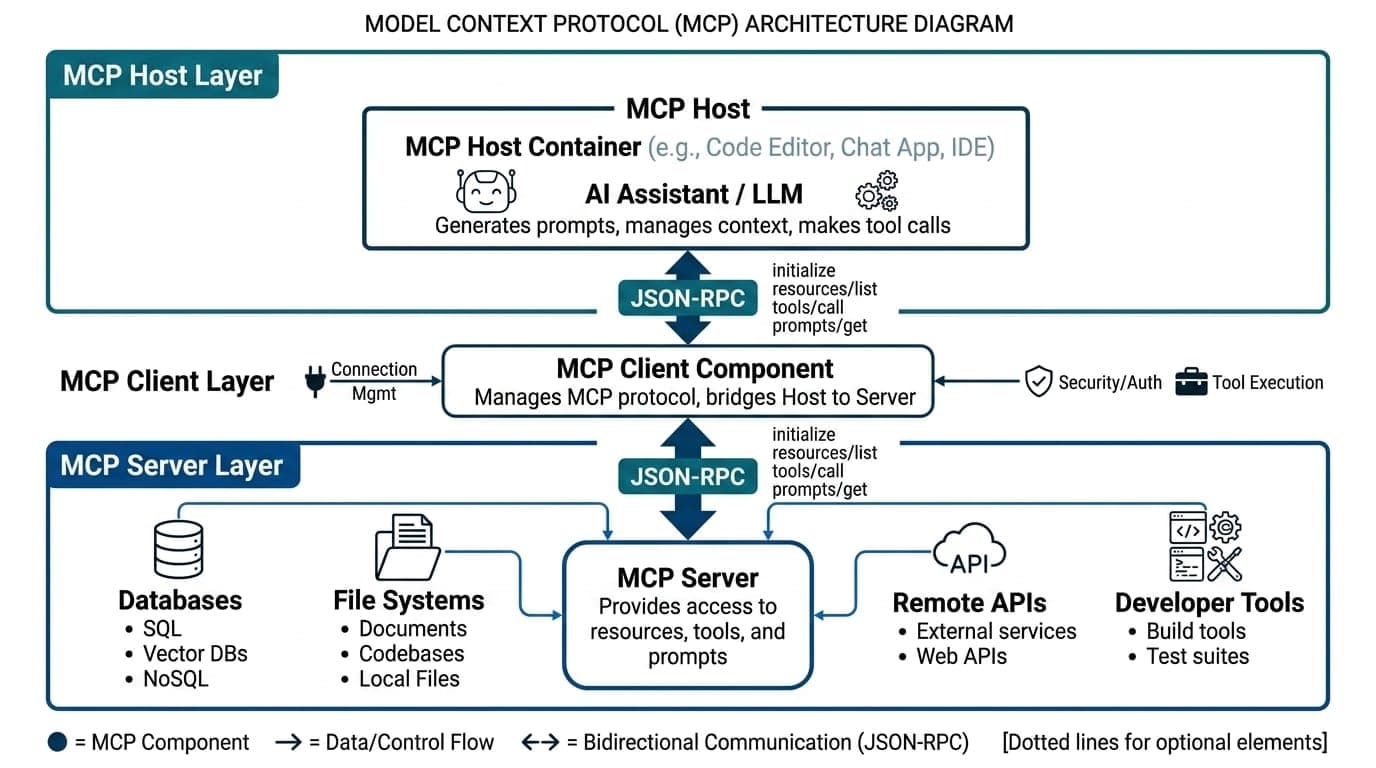
The Model Context Protocol uses a straightforward client-server architecture with three core components that work together to enable AI systems to interact with external tools and data sources.
MCP Host
The MCP host is the AI application you interact with, Claude Desktop, ChatGPT, VS Code with Copilot, or Cursor. The MCP host contains the LLM and serves as your interface. It provides the environment where the context protocol operates, managing user interactions and coordinating requests between the AI model and external systems.
MCP Client
The MCP client sits inside the MCP host and handles communication. It translates the LLM's needs ("I need to check the user's calendar") into standardized context protocol requests, then converts the server's response back into context the LLM can use. The MCP client is responsible for discovering available MCP servers, managing connections, and ensuring proper data flow.
MCP Server
An MCP server is the external service that provides capabilities to AI systems. MCP servers connect to systems like databases, file systems, web APIs, or specialized tools. When an MCP server receives a request from the client, it performs the action (query a database, read a file, call an API) and returns structured data. Multiple MCP servers can run simultaneously, each providing different external tools and data sources.
Transport Layer
Communication between the MCP client and MCP server uses JSON-RPC 2.0 messages over two main transport methods:
- Standard input/output (stdio): For local resources. Fast, synchronous, works offline. Perfect for development environments.
- Server-sent events (SSE): For remote resources. Supports real-time streaming and multiple concurrent connections across networks.
How the Model Context Protocol Works in Practice
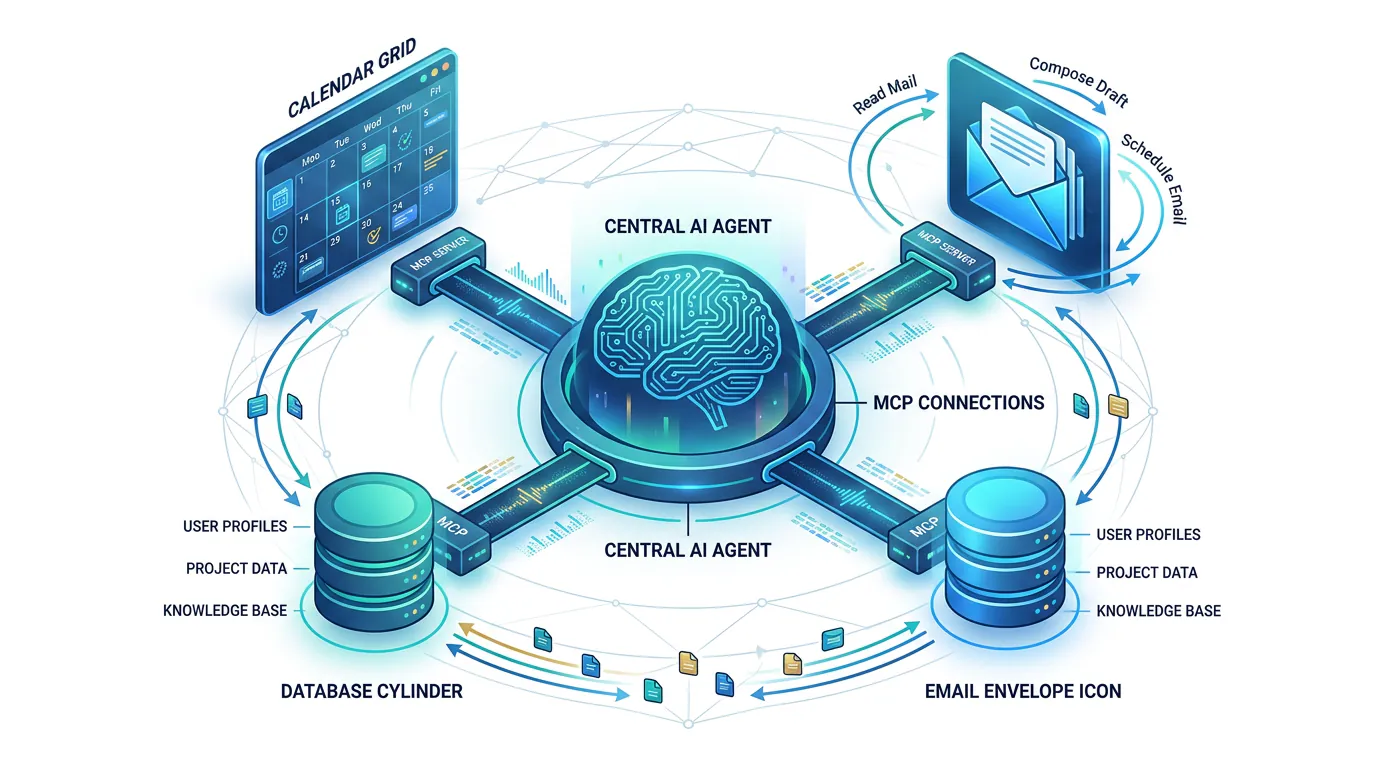
Say you ask your AI assistant: "Pull last month's sales data from our database and email the summary to my manager."
Here's how the context protocol handles this:
- Tool discovery: The LLM recognizes it can't access databases or send emails directly. The MCP client queries available MCP servers and discovers
database_queryandemail_sendertools. - First tool call: The LLM generates a structured request to the
database_querytool with parameters (date range, table name). The MCP client sends this JSON-RPC request to the appropriate MCP server. - Data retrieval: The MCP server translates the request into a secure SQL query, executes it against external systems, and returns the sales data in a structured format the context protocol can handle.
- Second action: With the data in hand, the LLM calls the
email_sendertool, providing your manager's email and the formatted report. The MCP server executes this action. - Confirmation: The LLM responds: "I pulled last month's sales data (47 transactions, $128,340 total) and emailed the summary to your manager."
This entire flow happens through standardized context protocol calls. No custom API wrappers, no hardcoded integrations.
What the Model Context Protocol Enables
The Model Context Protocol provides AI systems with capabilities that weren't practical before:
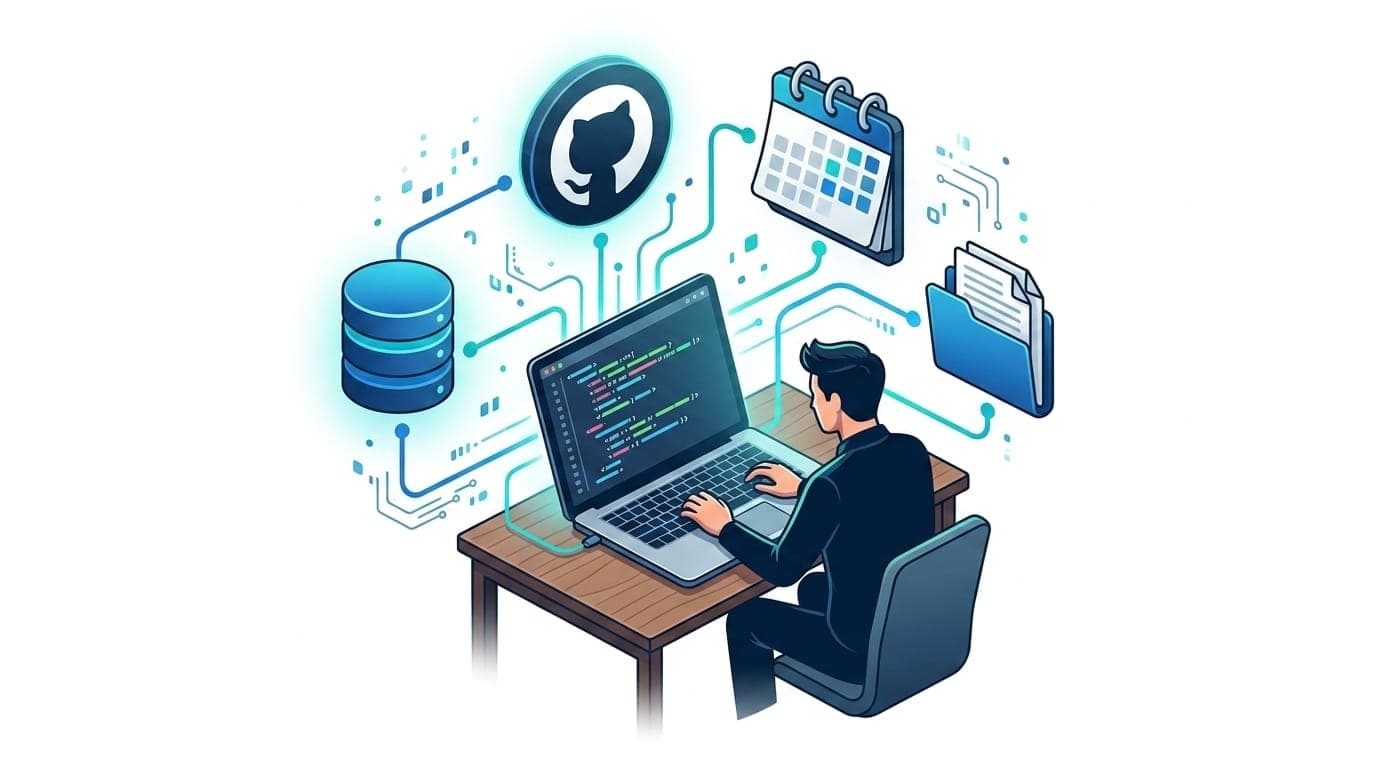
- Personalized AI assistants: Connect Claude or ChatGPT to your Google Calendar, Notion, Slack, and GitHub. Your AI assistant knows your schedule, can draft messages based on your writing style, and understands your codebase through connected MCP servers.
- Development environments: Claude Code can read Figma designs and generate complete web apps. VS Code and Cursor use the context protocol to give Copilot deeper access to your project files and databases through MCP servers.
- Enterprise AI agents: AI systems can query multiple databases across an organization, update CRM records, generate reports, and route content, all through natural language requests routed via the context protocol.
- System-level productivity tools: Applications like LockIn MCP use the Model Context Protocol to let AI assistants control system-level functions like blocking distracting websites during focus sessions, enforcing productivity workflows, and managing timers. These AI agents actively perform tasks rather than just suggest them.
Model Context Protocol vs RAG
People often confuse the Model Context Protocol with Retrieval-Augmented Generation (RAG). Both enhance LLMs with external information, but the context protocol and RAG serve different purposes:
| Feature | Model Context Protocol | RAG |
|---|---|---|
| Primary goal | Enable two-way interaction with external tools and data; AI systems can perform actions | Retrieve relevant content to improve response accuracy |
| Mechanism | Standardized context protocol for invoking functions and requesting structured data through MCP servers | Information retrieval system that augments the LLM's prompt with relevant documents |
| Interaction | Active, AI agents execute tasks in external systems via MCP servers | Passive, LLMs read content but don't take action |
| Use cases | Booking flights, updating databases, running code, managing calendars through connected MCP servers | Question answering, document summarization, factual grounding |
RAG makes AI responses more accurate by pulling in relevant documents. The Model Context Protocol makes AI systems capable by letting them interact with the real world. You can (and often should) use both together.
Who Created the Model Context Protocol?
Anthropic created the Model Context Protocol, led by David Soria Parra and Justin Spahr-Summers, and released it as an open standard in November 2024. The specification and SDKs are freely available on GitHub.
Major AI tools already support the context protocol:
- AI assistants: Claude Desktop, ChatGPT
- Development environments: Visual Studio Code, Cursor, Replit, Codeium
- Productivity tools: LockIn MCP (system-level distraction blocking), Zed
Early enterprise adopters include Block, Apollo, and Sourcegraph. Google Cloud has published detailed guides on building and deploying MCP servers on their infrastructure.
The ecosystem is growing fast. Anthropic maintains an open-source repository of pre-built MCP servers for Google Drive, Slack, GitHub, Postgres, Puppeteer, and more.
Building with MCP: Local vs Remote Servers
MCP servers can run locally or remotely, depending on your architecture needs:
Local MCP Servers
Best for tasks requiring low latency, offline access, or processing sensitive data that shouldn't leave your machine. Use cases:
- Reading local files or IDE context
- Accessing private file systems
- Controlling system-level tools (like distraction blockers)
- Development environments that need fast, synchronous responses
Local MCP servers use stdio transport and run as background processes on your machine.
Remote MCP Servers
Better for shared resources, scalability, and accessing cloud services. Use cases:
- Querying company databases
- Calling public APIs (weather, stock prices, web search)
- Enterprise tools accessed by multiple AI agents
- Computationally intensive tasks
Remote MCP servers use SSE transport and can be deployed on serverless platforms like Cloud Run or container orchestration services like Google Kubernetes Engine.
Security Considerations for the Model Context Protocol
Because the context protocol grants AI assistants access to real data and the ability to execute actions in external systems, security is critical.
Key security principles:
- User consent and control: Users must explicitly authorize data access and actions. AI systems should show what data will be accessed and what actions will be performed before executing through MCP servers.
- Data privacy: Sensitive content should only be exposed to MCP servers with clear user permission. Use encryption, access controls, and avoid including secrets in prompts sent through the context protocol.
- Tool safety: MCP servers can execute code and perform tasks in external systems. Users should review and approve tools before they run. Only trust tool descriptions from verified MCP servers.
- Secure output handling: Sanitize LLM outputs to prevent injection attacks or accidental data leaks, especially if content generated via the context protocol is rendered in web interfaces.
- Monitoring and auditing: Log interactions between MCP clients and MCP servers to detect unusual behavior. Track what data is accessed and what actions are performed for security audits.
Google Cloud's security guidance recommends treating MCP servers as part of your application's attack surface and applying the same security rigor you would to any API endpoint.
Getting Started with the Model Context Protocol
You can start using the context protocol today without writing code:
- Install Claude Desktop (macOS or Windows) from claude.ai
- Browse the pre-built MCP servers on GitHub
- Configure MCP servers in Claude Desktop settings (JSON config file)
- Start asking Claude to use your connected tools through the context protocol
For developers, Anthropic provides:
- Official SDKs (TypeScript, Python) for building MCP servers
- Quickstart guide for building your first context protocol server
- Reference implementations for common services
Claude 3.5 Sonnet is particularly good at writing code for MCP servers, making it fast to connect new data sources through the context protocol.
The Model Context Protocol and AI Productivity
The Model Context Protocol represents a fundamental shift in how AI assistants work. Instead of conversational interfaces that can only generate text, we get AI agents that can read your data, understand your context, and perform tasks on your behalf through connected MCP servers.
For productivity tools, this is transformative. An AI assistant with the context protocol can:
- Check your calendar and suggest optimal focus blocks
- Monitor your work patterns and proactively block distracting sites through system-level MCP servers
- Pull data from multiple tools to generate reports
- Automate multi-step workflows that span different external systems
This is why tools like LockIn MCP use the protocol, not just for connecting AI to data, but for giving AI agents control over system-level productivity enforcement. Your AI assistant can literally block Reddit when you tell it you need to focus for two hours, executing real actions through the context protocol.
The Model Context Protocol makes AI assistants less like chatbots and more like operating systems for work.
Common Questions About the Model Context Protocol
What is the Model Context Protocol in simple terms?
The Model Context Protocol is a standard "language" that lets AI assistants connect to external tools and data sources. Think of it like a USB port for AI, one standard connection that works with many different devices (or in this case, data sources and tools accessed through MCP servers).
What Is MCP and Why Is It Used?
MCP (Model Context Protocol) is used to solve the isolation problem of AI models. Without the context protocol, LLMs can only work with training data and can't access real-time information or perform tasks in external systems. MCP provides a standardized way for AI applications to connect with databases, APIs, and tools, making AI agents far more useful for real work.
Is the Model Context Protocol only for developers?
No. While developers build MCP servers, end users benefit immediately. If you use Claude Desktop or ChatGPT, you can connect pre-built MCP servers without writing code. The technical implementation is hidden; you just grant permissions and use the tools through natural language via the context protocol.
Does the context protocol work with all AI models?
The Model Context Protocol is model-agnostic. Any AI application can implement MCP clients to connect with MCP servers. Currently, Claude, ChatGPT, and major development tools support the context protocol. As an open standard, adoption is growing across the AI ecosystem.
How is MCP different from APIs?
Traditional APIs require custom integration code for each model and service combination. The Model Context Protocol standardizes this, one MCP server works with any MCP client. The context protocol is specifically designed for AI applications, with built-in support for tool discovery, structured data exchange, and context management that traditional APIs don't provide.
Can MCP servers access my data without permission?
No. MCP servers require explicit authorization. Users must configure which MCP servers their AI assistant can access through the context protocol and approve actions before they execute. The protocol includes security controls, but implementation quality matters, only use MCP servers from trusted sources.
What programming languages support building MCP servers?
Anthropic provides official SDKs for TypeScript and Python for building MCP servers. The context protocol is open, so community implementations exist in other languages. Because the Model Context Protocol uses JSON-RPC, any language with JSON support can implement MCP clients or MCP servers.
Conclusion
The Model Context Protocol solves one of the biggest limitations of AI assistants: isolation from the real world. By providing a standardized way to connect LLMs to external data and tools through MCP servers, the context protocol transforms conversational AI into capable AI agents that can access current information, understand your context, and perform meaningful tasks.
The protocol is already supported by major AI tools, backed by growing enterprise adoption, and powered by a vibrant open-source ecosystem. Whether you're a developer building AI applications with MCP servers or a power user looking for more capable AI assistants, the Model Context Protocol is becoming the foundation of how AI systems interact with data and external systems.
Ready to see the context protocol in action? Install Claude Desktop and connect your first MCP server. Or if you want an AI assistant that can actively enforce your productivity through the Model Context Protocol, check out LockIn MCP, where AI agents don't just suggest you focus, they block your distractions for you.
