Blog
Best AI Productivity Coach Tools in 2026
 Mil Hoornaert · 16 min read
The best AI productivity coach tools in 2026 combine task automation with behavioral guidance and focus enforcement. ChatGPT and Claude handle general prompting, Motion and Notion AI optimize scheduling and workflows, while tools like LockIn MCP actively block distractions at the system level to keep you on task.
Key takeaways:
- AI productivity coaches go beyond task execution by providing proactive workflow optimization and behavioral guidance
- General AI assistants (ChatGPT, Claude, Perplexity) excel at ideation, drafting, and research but require discipline to use effectively
- Specialized scheduling tools (Motion, Reclaim, Clockwise) use AI to protect focus time and automate calendar management
- System-level focus enforcers like LockIn MCP integrate with AI coaches to actively block distractions and enforce boundaries
- The most effective productivity stack combines a general AI assistant, a scheduling tool, and a distraction blocker
What Makes an AI Productivity Coach Different
An AI productivity coach is more than just another chatbot. While tools like ChatGPT can answer questions and generate text, true productivity coaches actively shape how you work. They analyze your patterns, suggest workflow improvements, automate repetitive decisions, and in some cases, enforce boundaries that keep you focused.
The distinction matters. A general AI assistant waits for your prompts. A productivity coach observes your behavior, flags inefficiencies, and intervenes before you waste time. The best AI tools in this category combine three capabilities: intelligent automation (handling routine tasks), proactive guidance (suggesting better approaches), and enforcement mechanisms (blocking distractions or protecting focus time).
According to Zapier's 2026 AI productivity research, nearly 80% of enterprises struggle to integrate AI tools with their existing workflows. The productivity coaches that succeed are those that embed directly into your daily environment rather than requiring you to switch contexts constantly. As noted by DataCamp's productivity analysis, "The best AI productivity tool is the one you actually use consistently."
How We Evaluated These Tools
We tested each AI productivity coach across five dimensions:
- Integration depth, Does it work where you already spend time, or does it require constant context-switching?
- Behavioral guidance, Does it proactively suggest improvements, or just react to your commands?
- Focus enforcement, Can it actively block distractions, or does it rely on your willpower?
- Workflow automation, Does it handle repetitive decisions automatically?
- Real-world reliability, Does it work consistently in daily use, or does it require constant babysitting?
We prioritized AI tools that integrate at the system level or within apps you already use daily. Browser-only extensions and standalone apps ranked lower because they require more discipline to stick with long-term.
Best AI Productivity Coaches by Category
General AI Assistants and Chatbots
These AI tools handle the widest range of productivity tasks but require the most discipline to use effectively.
ChatGPT remains the most versatile AI assistant for productivity work. GPT-5.5 handles text generation, code writing, problem-solving, and even image analysis in the same conversation. The free tier is genuinely useful, though the $20/month Plus subscription removes usage limits and adds features like memory across sessions.
ChatGPT excels at breaking down complex projects, generating first drafts, and explaining difficult concepts. You can use it to process email threads, draft responses, and automate routine communication tasks. The weakness? It's entirely reactive. ChatGPT won't remind you to stay on task or block Reddit when you're supposed to be writing. For that, you need enforcement tools.
According to OpenAI's usage statistics, ChatGPT has over 300 million weekly active users, making it the most widely adopted AI productivity tool in 2026.
Best for:Drafting, brainstorming, research, and general problem-solving when you already know what you should be working on.
Pricing:Free tier available; Plus at $20/month
Anthropic's Claude handles long documents better than any other chatbot. The large context window means you can upload entire research papers, codebases, or meeting transcripts and get coherent analysis in a single session. Claude's writing tends to be more measured and professional than ChatGPT's, making it better for formal communications.
Claude's Artifacts feature generates code or documents in a separate panel you can preview and edit. For developers and writers who need to iterate quickly on prompts, this workflow saves real time. Like ChatGPT, Claude won't enforce focus, it's a powerful tool that assumes you're already disciplined.
Best for:Long document analysis, professional writing, coding assistance, and research synthesis.
Pricing:Free tier available; Pro at $20/month
Perplexity sits between a search engine and an AI assistant. Every answer includes cited sources, which makes it far more trustworthy for research than uncited chatbot responses. It searches the live web, so information stays current.
Perplexity's focus modes let you search specifically within academic papers, YouTube, Reddit, or other domains. For knowledge workers who spend hours researching daily, the Pro tier ($20/month) adds access to more capable models and higher query limits. The free tier is surprisingly capable for occasional research.
Best for:Fact-checking, research with sources, staying current on industry trends.
Pricing:Free tier available; Pro at $20/month
AI-Powered Scheduling and Task Management
These AI tools actively organize your calendar and protect your focus time, they don't wait for you to ask.
Motion is an AI scheduler that treats your tasks as calendar blocks. You add tasks with deadlines and priority levels, and Motion automatically schedules them based on your availability. When meetings get added or tasks run long, Motion reshuffles everything to keep you on track.
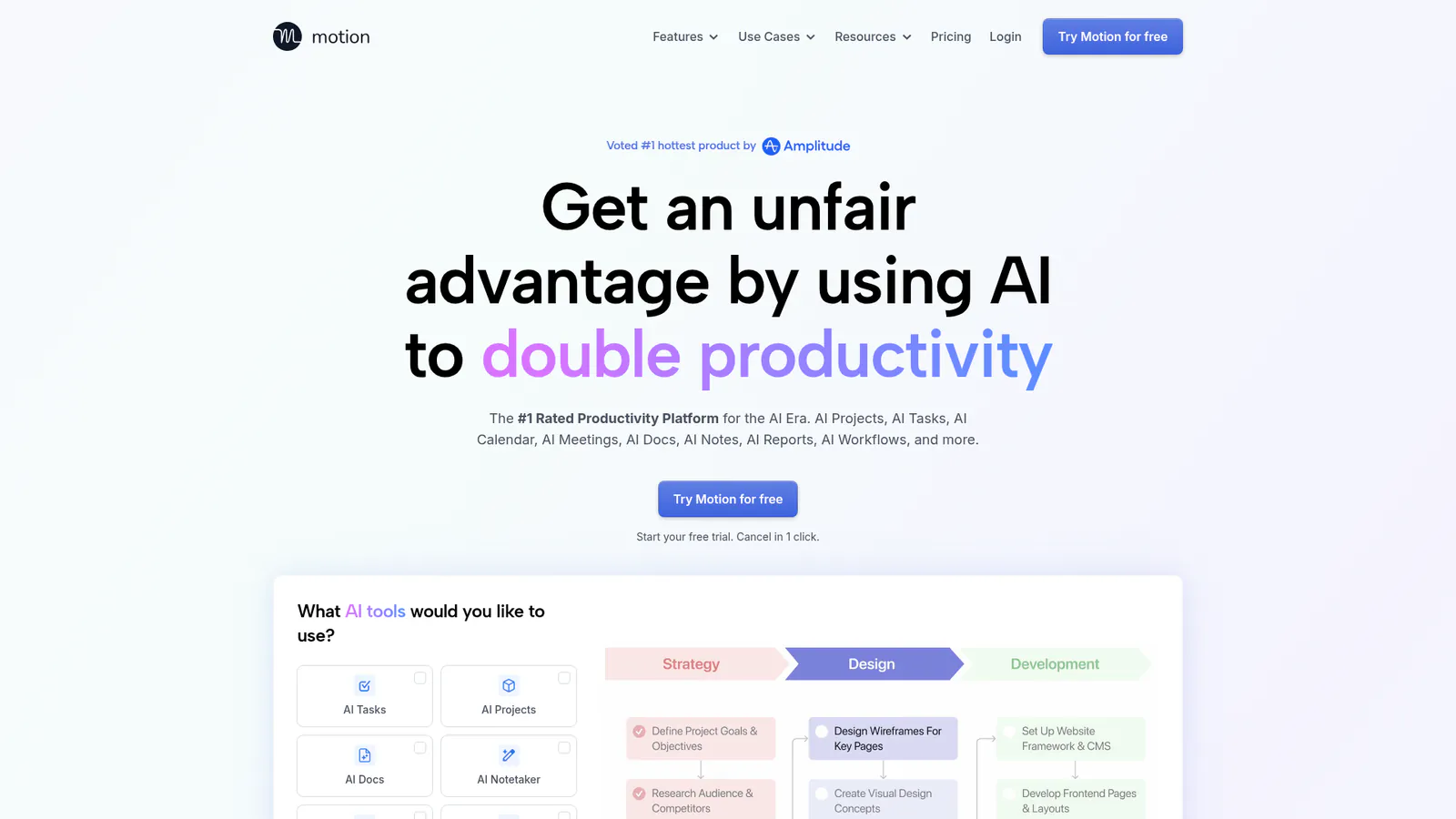
Motion's strength is automated prioritization. Instead of manually dragging tasks around your calendar, you tell Motion what matters and let it handle the logistics. The AI agent continuously optimizes your schedule based on changing priorities. The $34/month price is steep compared to free alternatives, but for professionals juggling dozens of tasks weekly, the time saved justifies the cost.
According to Motion's case studies, users report saving an average of 13.5 hours per week through automated scheduling.
Best for:Knowledge workers with complex, shifting priorities who need automated task scheduling.
Pricing: $34/month (individual); $24/month/user (teams)
Notion AI adds intelligence directly inside Notion workspaces. You can ask it to summarize meeting notes, generate action items, draft project briefs, or translate content without leaving your pages. For teams already embedded in Notion, the $10/month per user add-on eliminates constant context-switching between apps.
Notion AI's Q&A feature searches across your entire workspace, which becomes incredibly valuable as your knowledge base grows. The limitation? It only works inside Notion. If your team doesn't already use Notion as a central hub, you won't get much value here.
Best for:Existing Notion users who want AI assistance without switching apps.
Pricing: $10/month per user (add-on to Notion plans)
Reclaim protects your calendar from meeting overload. You define habits (exercise, focused work, breaks) and Reclaim defends that time by automatically declining or rescheduling conflicting meetings. It also syncs personal and work calendars to prevent double-booking.
Reclaim's scheduling links are smarter than Calendly because they respect your protected time blocks. When someone tries to book a meeting during your focus hours, Reclaim only shows available slots that won't compromise your priorities. The free tier covers individual use; teams start at $8/month per user.
Best for:Professionals whose calendars fill with meetings and who need automated protection for focus time.
Pricing:Free for individuals; $8/month per user (teams)
Clockwise optimizes team calendars by automatically moving flexible meetings to create longer blocks of uninterrupted focus time. It analyzes everyone's schedules and finds opportunities to consolidate meetings, giving you back hours of deep work time each week.
Clockwise works best for teams. Individual users get some benefit from focus time protection, but the real value comes from coordinating multiple calendars simultaneously. If your team is constantly fragmented by poorly timed meetings, Clockwise can fix that at scale.
Best for:Teams that need coordinated focus time across multiple calendars.
Pricing:Free tier available; teams start at $8/month per user
Focus Enforcement and Distraction Blocking
Scheduling tools protect time on your calendar. Focus enforcers actually block the sites and apps that derail you.
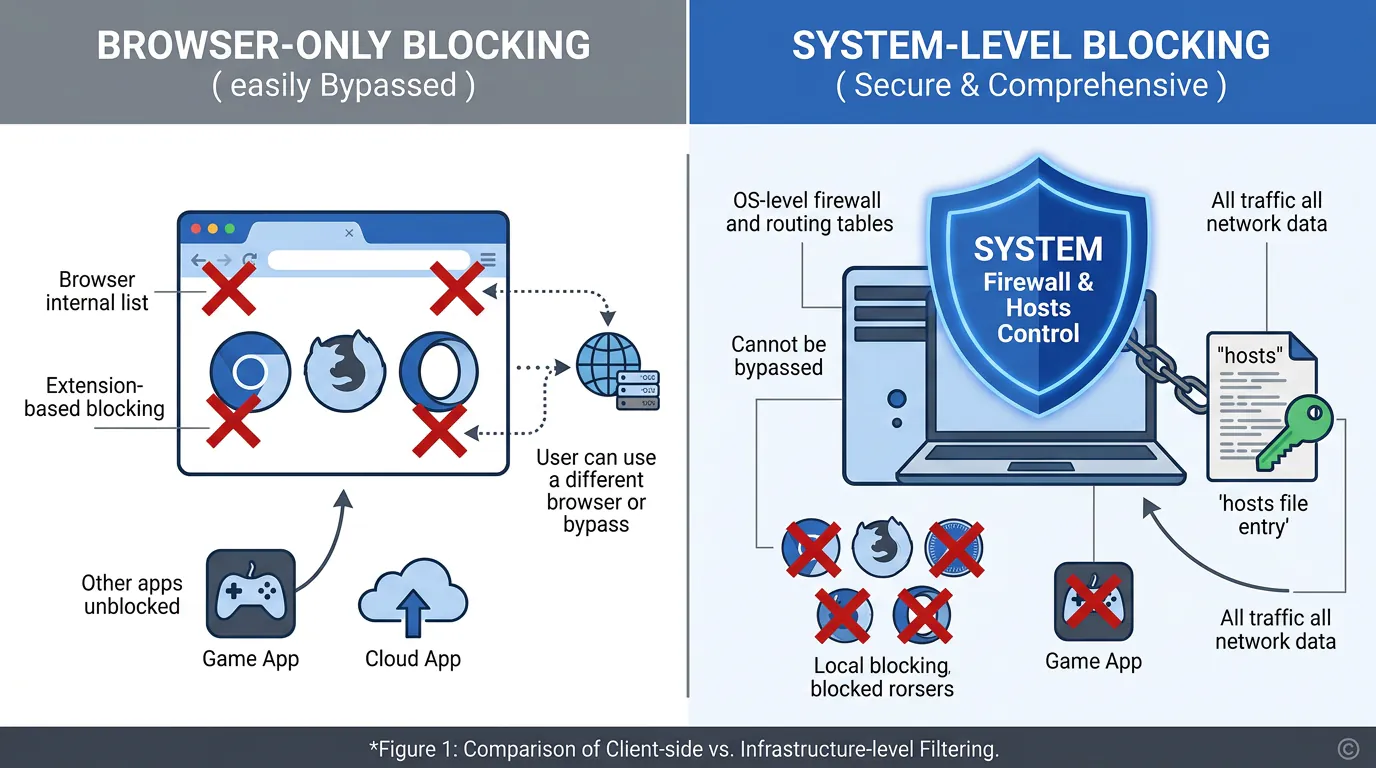
LockIn MCP turns your AI assistant into a productivity enforcer. Instead of just telling you to focus, it blocks distracting sites at the system level using your hosts file and a background MCP server. You start a focus session through Poke, Claude, ChatGPT, or the Chrome extension, and LockIn immediately cuts off access to time-wasting sites.
The system-level blocking is harder to bypass than browser extensions. LockIn works across all browsers simultaneously and requires you to justify unblocks through your AI assistant, which creates accountability. Installation takes one command: npx -y lockin-mcp install. The $2.99/month Pro tier adds cross-device sync and unlimited AI-connected focus sessions.
LockIn MCP fills the enforcement gap that scheduling tools and AI assistants leave open. Motion can schedule your focus time, ChatGPT can help you work through tasks, but only LockIn actively prevents you from opening Reddit mid-session. It's designed for people who already use AI tools like ChatGPT and want their AI agent to enforce boundaries.
Best for:Anyone who uses AI assistants and struggles with browser-based distractions during deep work.
Pricing:Free trial available; Pro from $2.99/month
For a detailed comparison with similar tools, see LockIn MCP vs Freedom and LockIn MCP vs Cold Turkey.
Freedom blocks websites and apps across all your devices simultaneously. You can create recurring block schedules or start sessions on demand. Freedom supports Windows, Mac, iOS, and Android with native apps for each platform.
The cross-device sync is Freedom's main advantage. If you need to block Instagram on your phone while working on your laptop, Freedom handles both at once. The $8.99/month subscription covers unlimited devices. For users who need multi-platform blocking without AI integration, Freedom is solid.
Best for:Multi-device users who want scheduled blocking without AI assistant integration.
Pricing: $8.99/month or $49/year
Cold Turkey offers the strongest desktop blocking available. Once a block session starts, even uninstalling Cold Turkey won't restore access. This nuclear option works for users who need absolute enforcement and are willing to commit upfront.
Cold Turkey Blocker is a one-time $49 purchase. There's no subscription, and it works offline. The intensity makes it unsuitable for users who need flexibility during focus sessions. If you want a lighter, AI-integrated approach, compare Cold Turkey to LockIn MCP.
Best for:Users who need maximum enforcement and are comfortable with rigid blocking rules.
Pricing: $49 one-time purchase
Knowledge Management and AI Grounding
These AI tools connect AI assistants to your personal knowledge base, making responses more relevant and reducing hallucinations.
NotebookLM builds a private AI assistant grounded in your uploaded documents. You add PDFs, Google Docs, or URLs, and NotebookLM answers questions based only on those sources. No hallucinations from general training data because the model only references what you've provided.
The Audio Overview feature generates podcast-style summaries of your documents, which is genuinely useful for absorbing dense research. NotebookLM is currently free and works best for researchers, students, and anyone synthesizing large volumes of source material. According to DataCamp's analysis, "NotebookLM is one of the most underrated productivity tools available in 2026."
Best for:Research synthesis, studying, and working with large document collections.
Pricing:Free
Mem automatically organizes your notes using AI tagging and connections. Instead of manually filing notes into folders, you dump information into Mem and trust the AI to surface relevant notes when you need them. The search functionality understands context, so queries like "ideas from last month's brainstorm" return the right results without exact keyword matches.
Mem works best for individuals with messy, unstructured note-taking habits. The free tier is usable; Mem Pro at $15/month adds more AI features and higher usage limits.
Best for:Individuals who need AI-powered organization for chaotic note collections.
Pricing:Free tier available; Pro at $15/month
Workflow Automation and AI Agents
These AI tools connect AI capabilities across multiple apps to automate complex workflows.
Zapier connects 9,000+ apps and adds AI orchestration through Zapier Agents and built-in AI actions. You can build workflows that trigger automatically based on events, use AI to process data mid-workflow, and take actions across your entire tech stack without writing code.
Zapier's AI features include Copilot (natural language workflow builder), AI by Zapier (ChatGPT integration), and Zapier Agents (autonomous AI teammates that handle multi-step processes). The platform lets you connect AI tools like ChatGPT and Claude to apps like Slack, email systems, and project management platforms. For teams that need sophisticated automation, Zapier is the industry standard. Free tier covers basic workflows; paid plans start at $29.99/month.
Best for:Teams automating complex processes across multiple apps with AI processing in the middle.
Pricing:Free tier available; paid plans from $29.99/month
How to Choose the Right AI Productivity Coach
Start with one tool per category rather than trying to adopt everything at once. Here's a practical decision framework:
If you want one general-purpose AI assistant:Start with ChatGPT or Claude. Try both for a week and stick with whichever fits your writing style. Most tasks work fine on the free tier.
If your calendar is a mess:Motion (automated task scheduling), Reclaim (habit protection), or Clockwise (team focus time optimization). Motion works best for individuals with complex priorities; Clockwise excels at team coordination.
If you struggle with digital distractions:LockIn MCP for AI-integrated system-level blocking, Freedom for multi-device scheduled blocks, or Cold Turkey for maximum enforcement. Compare system-level blockers to find the right balance of flexibility and strictness.
If you need AI grounded in your documents:NotebookLM for research synthesis, Mem for messy note organization.
If you're automating workflows across apps:Zapier for connecting AI tools and orchestrating AI actions at scale.
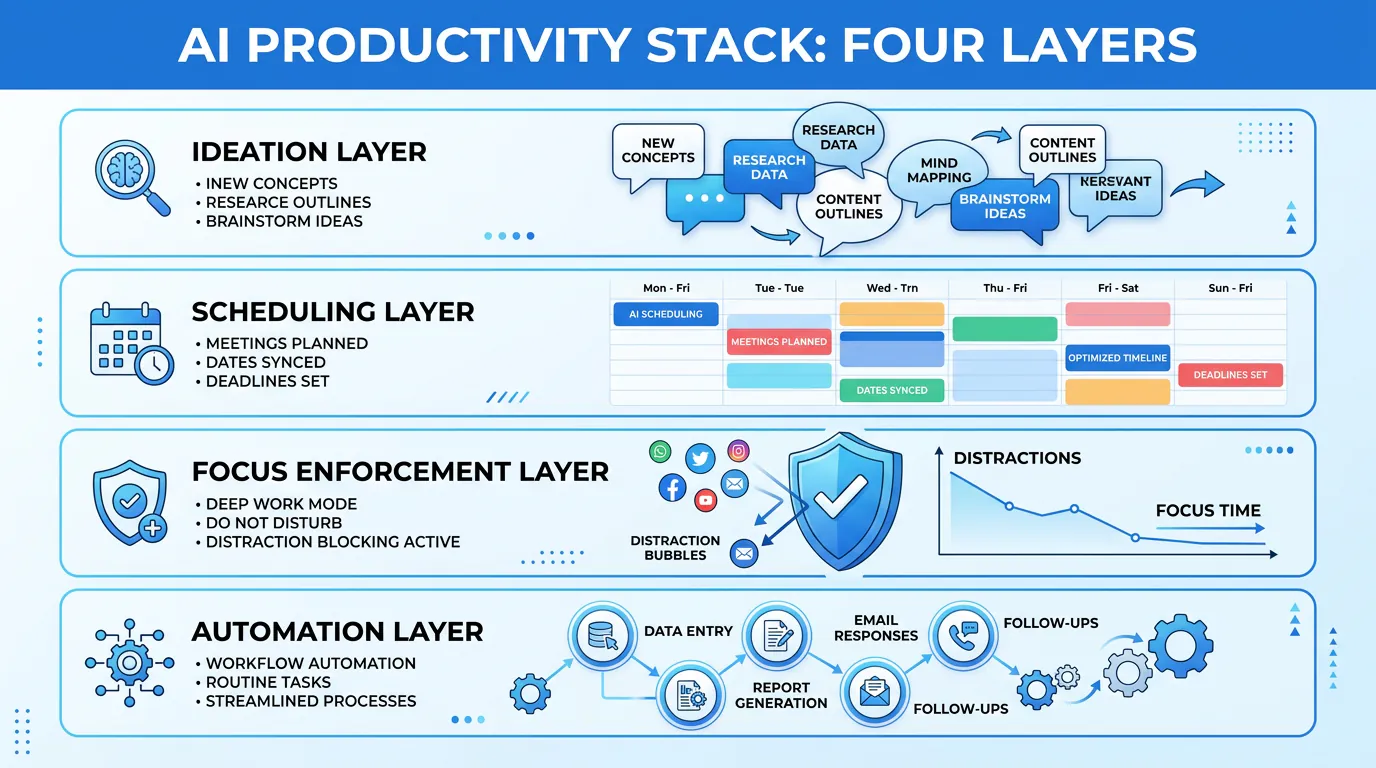
The best productivity stack for most knowledge workers combines three layers: a general AI assistant (ChatGPT or Claude) for creative work, a scheduling tool (Motion or Reclaim) for time management, and a focus enforcer (LockIn MCP or Freedom) for distraction blocking. Each layer handles a different aspect of productivity without overlapping.
Why You Shouldn't Just Use ChatGPT
ChatGPT is powerful, but it's not enough by itself. The problem with relying only on general AI assistants is they lack enforcement mechanisms. ChatGPT can help you plan your day, write email responses, and break down projects, but it can't stop you from opening Twitter mid-task.
This is where specialized AI productivity tools matter. According to research from Slack's productivity team, the most effective productivity systems layer multiple tools:
- ChatGPT handles ideation and drafting, It's excellent for creative work and problem-solving
- Motion or Reclaim schedules your focused work, They protect time blocks automatically
- LockIn MCP enforces boundaries, It actively blocks distractions during those protected blocks
- Zapier connects everything, It automates handoffs between tools
The first tool (ChatGPT) creates a plan. The second tool (Motion) schedules it. The third tool (LockIn MCP) enforces it. The fourth tool (Zapier) makes sure work flows between stages automatically.
Relying solely on ChatGPT means you're depending on willpower to follow through on the plans it helps you create. Layering specialized AI tools removes willpower from the equation by automating scheduling and actively blocking distractions.
Integrating AI Coaches into Your Workflow
The mistake most people make is adopting AI productivity tools one at a time without considering how they fit together. The best approach is system design:
Layer 1: Planning and ideation, Use ChatGPT or Claude to break down projects, draft outlines, and clarify thinking before you start executing. These AI tools excel at processing ambiguous prompts and generating structured plans.
Layer 2: Scheduling and time protection, Use Motion or Reclaim to automatically schedule tasks and defend focus time from meeting sprawl. Let the AI agent handle calendar logistics so you don't have to.
Layer 3: Focus enforcement, Use LockIn MCP or similar blockers to actively prevent distractions during the focus blocks your scheduler protected. System-level blocking works across all browsers.
Layer 4: Automation, Use Zapier to connect everything together, automating handoffs between AI tools so nothing falls through the cracks.
This layered approach works because each tool handles a specific failure mode. Your AI assistant helps you decide what to work on. Your scheduler carves out time to do it. Your focus enforcer makes sure you actually do the work instead of checking Twitter. Your automation tool makes sure completed work flows to the next step without manual intervention.
For teams, add collaboration layers: Notion AI or similar workspace tools for shared knowledge, Clockwise for coordinated team focus time, and meeting assistants like Granola or Otter.ai for automatic note-taking.
Can AI Coaching Replace Human Productivity Systems?
Not entirely. AI productivity coaches excel at automating routine decisions, blocking known distractions, and optimizing schedules based on patterns. They struggle with understanding deeper motivation, adapting to major life changes, and questioning whether you're working on the right things at all.
The best use of AI coaching is handling the tactical layer of productivity, what to work on today, when to schedule it, how to stay focused, while you retain strategic oversight. AI tools like Motion schedule your tasks but can't tell you whether those tasks align with your long-term goals. LockIn MCP blocks Reddit during focus sessions but can't decide if you're focusing on the right project.
Use AI coaches to automate the boring parts of staying productive. Keep the big-picture thinking for yourself.
Frequently Asked Questions
What is an AI productivity coach?
An AI productivity coach is a tool that uses artificial intelligence to provide proactive guidance on managing time, tasks, and focus. Unlike general AI assistants that wait for prompts, productivity coaches analyze your behavior, suggest workflow improvements, automate scheduling decisions, and in some cases enforce boundaries by blocking distractions.
Do I need to pay for AI productivity tools?
Not necessarily. ChatGPT, Claude, Perplexity, NotebookLM, and several other powerful AI productivity tools offer genuinely useful free tiers. Paid subscriptions ($10-20/month typically) remove usage limits, add priority access, and unlock advanced features. For specialized AI tools like Motion or LockIn MCP, free trials let you test before committing to subscriptions.
What's the difference between an AI assistant and an AI productivity coach?
An AI assistant (like ChatGPT) responds to your prompts but doesn't guide your behavior or enforce boundaries. An AI productivity coach actively shapes your workflow by automating scheduling, protecting focus time, blocking distractions, or suggesting process improvements. The best productivity stacks combine both: general AI assistants for creative work and specialized coaches for execution and focus.
Can AI productivity coaches work together?
Yes, and they should. The most effective approach is layering AI tools: a general AI assistant for ideation and drafting, a scheduling tool for time management, a focus enforcer for distraction blocking, and automation tools to connect everything. Tools like LockIn MCP integrate directly with ChatGPT, Claude, and Poke so your AI assistant can start focus sessions and enforce boundaries.
Are AI productivity coaches worth it for teams?
Absolutely. AI tools like Clockwise, Notion AI, and Zapier become more valuable as team size increases because they coordinate across multiple calendars, knowledge bases, and workflows. Team plans typically cost $8-24/month per user. For distributed teams juggling complex projects, AI coaches that automate coordination and protect shared focus time deliver measurable ROI.
How do system-level blockers differ from browser extensions?
System-level blockers like LockIn MCP and Cold Turkey modify your computer's hosts file or use low-level APIs to block sites across all browsers and apps simultaneously. Browser extensions only work in one browser and are easily bypassed by switching browsers or using incognito mode. For serious focus enforcement, system-level blocking is significantly more effective. See our guide on system-level website blockers for Mac and Windows for detailed comparisons.
Can I use AI productivity coaches offline?
Some AI tools work offline, others don't. ChatGPT, Claude, and Perplexity require internet connections because they run in the cloud. LockIn MCP's blocking works offline once configured because it modifies your local hosts file, though connecting to AI assistants requires internet. Cold Turkey operates entirely offline. If offline capability is critical, prioritize AI tools with local enforcement mechanisms rather than cloud-only services.
Get More Done with the Right AI Productivity Stack
The best AI productivity coach tools don't just execute tasks, they actively shape how you work. General AI assistants like ChatGPT and Claude handle creative and analytical work. Scheduling tools like Motion and Reclaim protect your time. Focus enforcers like LockIn MCP block distractions when it matters most.
The most effective approach is layering these AI tools into a system where each handles a specific productivity failure mode. Your AI assistant decides what to work on. Your scheduler allocates time for it. Your focus enforcer makes sure you follow through.
Start with one-line installation of LockIn MCP to connect your AI assistant directly to system-level distraction blocking. Combine it with the scheduling and task tools that match your workflow, and you'll have a productivity stack that actually enforces the boundaries you set for yourself.
For more on building effective focus workflows, see How to Study Smarter With AI Without Digital Distractions and Why You Should Turn Your AI Assistant Into a System-Level Productivity Enforcer.
