Blog
Best Focus Apps for Students in 2026
The best focus apps for students in 2026 — Forest for phone locking, Freedom for cross-device Pomodoro, and LockIn MCP for AI-powered desktop blocking.
 Mil Hoornaert · 13 min read
The best focus apps for students in 2026 are Forest for phone-locking accountability, Freedom for cross-device Pomodoro sessions, and LockIn MCP for AI-powered desktop blocking. Choose based on your biggest distraction: phone apps need locking mechanisms, desktop distractions need system-level blocking, and scattered focus benefits from AI coaching.
Key takeaways:
- System-level blockers beat browser extensions, apps that block at the OS or network level can't be bypassed with one click
- Phone-locking apps work best for mobile distractions, if you lose hours on your phone, you need an app that forces commitment
- AI-powered tools add accountability, newer apps connect focus sessions to AI assistants that enforce blocks and track progress
- Student budgets matter, many top apps offer free tiers, student discounts, or one-time purchases under $30
- The best setup combines blocking with tracking, knowing where time goes helps you block the right sites
What Makes a Good Focus App for Students
Students face different distractions than office workers. You're switching between research, writing, problem sets, and readings on the same device that hosts Instagram, YouTube, and group chats. A good focus app needs to handle that reality.
Strong enforcement comes first.Browser extensions you can disable in two clicks don't work when motivation crashes at 10 PM before a deadline. Look for apps that block at the system level (hosts file, VPN, device lock) or require real friction to bypass.
Timers should be flexible.Most students don't work in perfect 25-minute blocks. The Pomodoro Technique is proven effective, but you need apps that let you customize session length for different tasks, sprints for flashcards, longer blocks for essays.
Cross-platform blocking saves you.If you block Reddit on your laptop but check it on your phone 30 seconds later, you didn't solve the problem. The strongest apps sync blocks across devices or force you to commit at the start of a session.
Free or cheap matters.Students can't drop $15/month on every productivity tool. The best focus apps for students either have generous free tiers or one-time pricing. Many apps offer free versions with limited features, making them accessible while you test what works.
Data helps you improve.Seeing exactly how much time you lost to YouTube yesterday is more motivating than any motivational quote. Apps with tracking and reports let you spot patterns and adjust.
Top Focus Apps for Students by Category
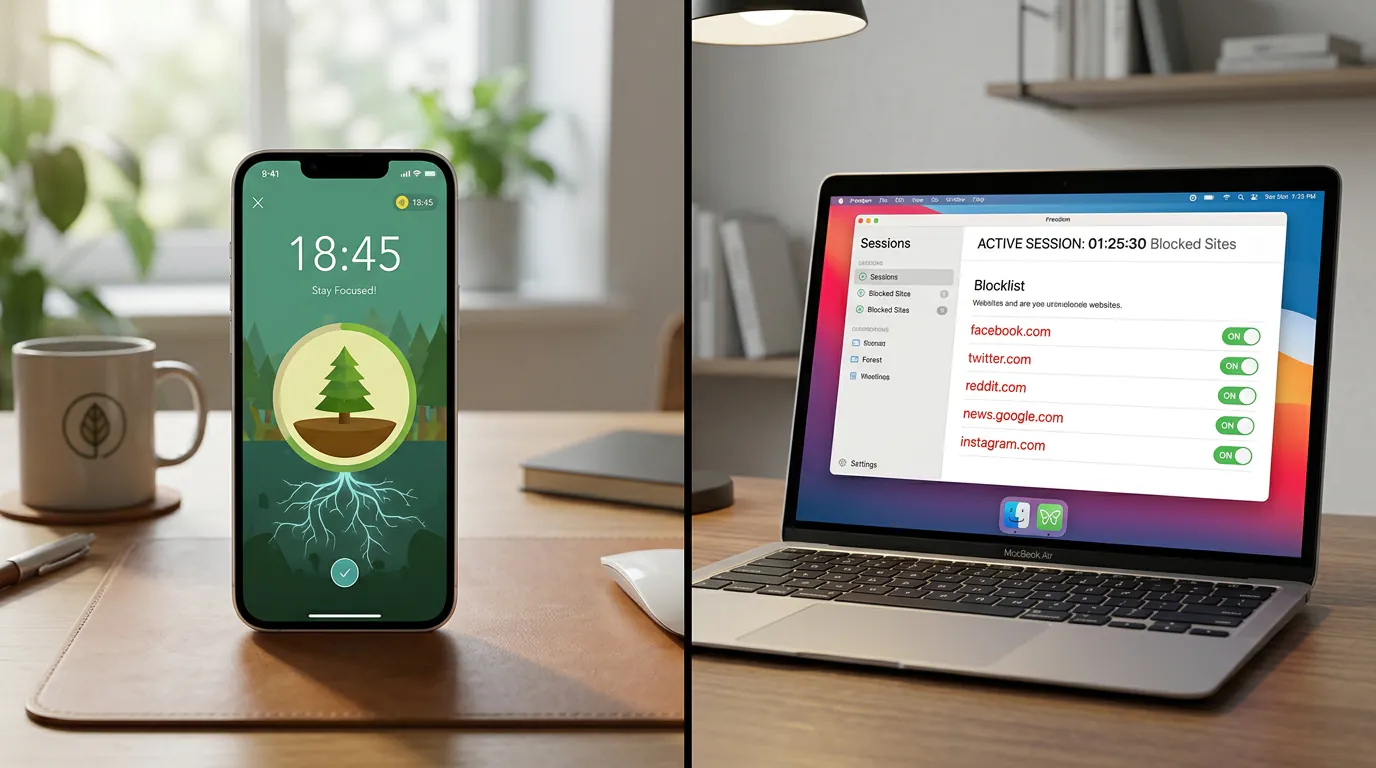
Best for Phone-Locking: Forest
Forest makes you plant a virtual tree when you start a focus session. Leave the app before the timer ends, and your tree dies. It's simple, visual, and genuinely effective at keeping you off your phone.
The app works by requiring your full commitment upfront. Once you plant a tree, leaving Forest to check messages or scroll Instagram kills your progress. Over time, you build a forest that represents hours of focused work. Forest also partners with Trees for the Future to plant real trees, which adds real-world impact to digital discipline.
Pricing:One-time purchase of $3.99 on iOS and Android Best for: Students who pick up their phone 40 times during a two-hour study block Platforms: iOS, Android
Best for Desktop Blocking: LockIn MCP
LockIn MCP turns AI assistants like ChatGPT, Claude, or Poke into a productivity enforcer that blocks distracting websites at the system level. Instead of manually managing blocklists, you tell your AI to "lock in for two hours" or "block social media until this essay is done," and it handles enforcement through your computer's hosts file.
This matters because it's the only focus app that integrates blocking directly into your AI workflow. If you're already using ChatGPT or Claude for research, study help, or writing, LockIn MCP makes the same assistant actively stop you from opening distractions. The setup is fast, one npx command installs the blocker and MCP server, and blocks work across all browsers on macOS, Linux, and Windows.
You can request temporary unblocks with accountability (your AI asks why you need access), start timed focus sessions through chat, and review session history. It's designed for students and developers who want system-level blocking without switching between five different productivity tools.
Pricing:Free trial, then from $2.99/month or $59.99 lifetime Best for: Students using AI assistants who want blocking built into their existing workflow Platforms: macOS, Linux, Windows (via Chrome extension)
Learn more about AI productivity and distraction blocking or see how it compares to other blockers.
Best for Cross-Device Pomodoro: Freedom
Freedom blocks distracting websites and apps across Mac, Windows, iPhone, and Android simultaneously. You can schedule recurring focus sessions (block Twitter every weekday from 9 AM to noon) or start sessions on demand. Locked Mode prevents you from disabling a block once it starts, which is exactly the kind of enforcement students need during finals week.
Freedom shines when your distractions span devices. Blocking Reddit on your laptop means nothing if you check it on your phone 30 seconds later. Freedom syncs blocks across everything, and its pre-made blocklists (social media, news, streaming) let you start immediately without manual setup.
Students using website blockers showed significant improvements in focus and task completion compared to willpower-only approaches.
Pricing:From $3.33/month (billed annually at $39.99/year) Best for: Students with cross-device distraction habits and Pomodoro workflows Platforms: macOS, Windows, iOS, Android, Chrome
Best for Gamification: Flowkin
Flowkin combines Pomodoro timers with creature collection mechanics. Every minute you stay focused earns XP and coins, which you use to hatch eggs containing one of 50 unique creatures. Each creature has three evolution stages, creating long-term goals that make studying feel less like a chore.
The gamification isn't just cosmetic. Students report that the creature unlock system creates genuine motivation to start the next study session. You're not just avoiding distractions, you're actively working toward hatching a rare creature or completing your collection. Daily login bonuses and streak rewards reinforce the habit.
Pricing:Free with in-app purchases Best for: Students who need external motivation beyond a basic timer Platforms: Android (iOS coming soon)
Best for Minimal Distraction: Tide
Tide pairs a focus timer with a library of ambient sounds: rain, ocean waves, forest, coffee shop noise. If your problem is noisy roommates or a chaotic dorm rather than social media, Tide helps you create an audio environment for focus.
The interface is deliberately minimal. You pick a sound, set a timer, and start. No gamification, no graphs, no feature bloat. For students who study better with background noise, Tide replaces both a timer and a Spotify playlist.
Pricing:Free with premium features available Best for: Students who focus better with ambient sound and want a simple timer Platforms: iOS, Android
Best for Task-Focused Sessions: Focus To-Do
Focus To-Do merges a Pomodoro timer with task management. You create tasks, organize them into projects, and attach Pomodoro sessions to specific tasks. This makes it easy to track not just how long you studied, but what you studied.
The advantage for students is structure. Instead of running a vague two-hour study session, you assign 25-minute blocks to "read Chapter 5," "outline essay intro," and "review bio flashcards." The app tracks which tasks took the most time, which helps with future planning.
Pricing:Free with premium option Best for: Students who need task management built into their focus timer Platforms: iOS, Android, macOS, Windows, web
Other Apps Worth Considering for Student Productivity
While focus apps are essential, students often need complementary tools for notes, flashcards, and organization. Here are a few that pair well with focus apps:
Notion offers a free version for students and works as an all-in-one workspace for notes, tasks, and class organization. Many students use Notion to keep track of assignments alongside their focus apps.
Todoist excels at deadline management with a clean interface and natural language input. The free tier handles most student needs, though the Pro version (with 50% student discount) adds reminders and filters. Learn more at Todoist.
GoodNotes is ideal for iPad students taking handwritten notes and annotating PDFs. If your classes involve diagrams, problem sets, or lecture slides, GoodNotes transforms your tablet into a digital notebook.
Obsidian works for research-heavy majors building a long-term knowledge base. It stores notes locally as Markdown files and offers a 40% student discount on sync. Check out Obsidian if you need backlinked notes.
Quizlet remains popular for flashcard-based memorization across subjects. Quizlet offers a free version with millions of study sets created by other students.
For design projects or presentations, Canva offers a free education plan with premium features. Visit Canva for Education to apply.
Quick Comparison: Best Focus Apps for Students
| App | Best For | Enforcement Level | Platforms | Price |
|---|---|---|---|---|
| Forest | Phone-locking | High (kills tree if you leave) | iOS, Android | $3.99 one-time |
| Freedom | Cross-device Pomodoro | Very high (Locked Mode) | Mac, Windows, iOS, Android | From $3.33/mo |
| LockIn MCP | AI-powered desktop blocking | Very high (system-level hosts) | macOS, Linux, Windows | From $2.99/mo |
| Flowkin | Gamified motivation | Medium (honor system) | Android | Free + IAP |
| Tide | Ambient sound + timer | Low (honor system) | iOS, Android | Free + premium |
| Focus To-Do | Task-based Pomodoro | Medium (honor system) | iOS, Android, desktop, web | Free + premium |
How to Choose the Right Focus App
Your phone is the problem:Start with Forest. If you physically can't stop picking up your phone during study blocks, Forest's dying-tree mechanic creates the accountability you need. It's cheap, works immediately, and partners with a real tree-planting org.
You need desktop blocking:Use LockIn MCP if you're already working with AI assistants, or Freedom if you want cross-device scheduled sessions. Both offer system-level blocking that browser extensions can't match. Check out our full guide to system-level website blockers for deeper comparisons.
You lose motivation halfway through:Try Flowkin or another gamified app. The creature collection creates external motivation when internal willpower fades. It's not just "study for 25 minutes", it's "study for 25 minutes and hatch a rare dragon."
Your environment is the issue:Use Tide if noise is the primary distraction. Coffee shop sounds or rain can mask background chaos better than music with lyrics.
You need structure and tracking:Focus To-Do works best when your study sessions feel scattered. Attaching Pomodoro blocks to specific tasks gives you clarity on what you accomplished and what keeps taking longer than expected.
Which Apps Are Best for Beginners?
If you're new to focus apps and productivity tools, start simple. The average student doesn't need a complex setup, just one or two tools that work immediately.
Forest is the easiest phone-based solution. Download it, plant a tree, and you're focused. The visual feedback is instant and the commitment mechanism is clear.
LockIn MCP works well for beginners using AI assistants because there's no separate interface to learn. You just tell ChatGPT or Claude what to block, and it happens. The free trial lets you test system-level blocking before committing.
Tide requires zero learning curve. Pick a sound, set a timer, press start. If you just need to keep track of study sessions without blocklists or gamification, Tide delivers.
Avoid starting with complex productivity stacks. One focus app plus one note-taking app (like Notion or GoodNotes) covers most student needs. Add tools only when you hit a specific limitation.
Which Apps Are Best for Organizing Study Materials?
Focus apps help you stay on task, but organizing study materials requires different tools:
Notion creates course dashboards where you can keep syllabi, reading lists, assignment trackers, and notes in one place. The free student plan includes unlimited blocks and file uploads.
GoodNotes excels at organizing handwritten notes and annotated PDFs. You can create separate notebooks for each class, search your handwriting, and sync across devices.
Obsidian works for students building interconnected knowledge systems. If you're writing a thesis, taking research-heavy courses, or planning graduate school, Obsidian's local Markdown files and backlinks create a permanent knowledge base.
For most undergraduates, Notion offers the best balance of organization power and ease of use. Graduate students and researchers often prefer Obsidian's local-first approach.
Tips for Getting the Most from Focus Apps
Start with scheduled blocks, not on-demand sessions.Decide the night before when you'll study, then schedule your blocks in advance. Apps like Freedom let you automate this, social media gets blocked every weekday from 9 AM to noon whether you remember to start a session or not.
Combine blocking with tracking.If you don't know where time goes, you can't block the right sites. Use LockIn MCP's session history or a time tracker like Chronoid to see exactly which websites eat your study time, then build your blocklists from real data.
Customize session length by task type.Reading assignments might need 45-minute blocks. Flashcard review works better in 15-minute sprints. Problem sets could take 90 minutes. Don't force every task into a 25-minute Pomodoro if it doesn't fit.
Use Locked Mode or system-level blocking during high-stakes work.If you're writing an essay due at midnight or cramming for tomorrow's exam, honor-system timers won't cut it. Freedom's Locked Mode or LockIn MCP's hosts-based blocking removes the option to cheat.
Review your data weekly.Most focus apps show time spent, sessions completed, or sites blocked. Check this every Sunday. If YouTube is the top leak three weeks in a row, add it to your permanent blocklist.
For more strategies, read our guide on how to study smarter with AI without digital distractions.
Best Free Setup for Students
If you're starting with zero budget:
- Forest (one-time $3.99 is worth it, but try the browser version first)
- Tide (free with ambient sounds)
- LockIn MCP (free trial to test system-level blocking)
- Notion (free version for students)
- Todoist (free tier handles basic task management)
If you have a small budget:
- Freedom ($3.33/month for cross-device blocking)
- LockIn MCP ($2.99/month or $59.99 lifetime for AI-powered blocking)
- Forest ($3.99 one-time)
- GoodNotes (free tier, or $6.99/year for full features)
Frequently Asked Questions
Do focus apps actually help students stay focused?
Yes, according to research. A study in Computers in Human Behavior found that students using website blockers showed measurable improvements in focus and task completion compared to willpower alone. The key is choosing apps with real enforcement, not just timers you can ignore. Focus apps work best when they remove the option to get distracted rather than relying on self-discipline alone.
What's the difference between browser extensions and system-level blockers?
Browser extensions only block within that browser and can be disabled in two clicks (disable extension, reload page). System-level blockers like LockIn MCP or Freedom modify your computer's hosts file or use VPN-based blocking, which works across all browsers and apps. They're much harder to bypass mid-session. According to research from the University of California, system-level intervention is more effective than voluntary tools for reducing digital distractions.
Can I use focus apps on both my phone and computer?
Yes. Freedom, LockIn MCP (via Chrome extension), and several others sync blocks across devices. This is critical because blocking Reddit on your laptop but checking it on your phone defeats the purpose. Cross-device blocking ensures distractions stay blocked regardless of which device you pick up.
Are free focus apps good enough for students?
For many students, yes. Apps like Tide, Focus To-Do (free tier), and even Forest's browser version offer solid features at no cost. Free apps work best when your issue is structure and timers. If your issue is genuine addiction to specific sites, paid apps with stronger enforcement usually work better. The free version of most apps lets you test whether the approach works before upgrading.
How long should student focus sessions be?
It depends on the task. The standard Pomodoro is 25 minutes, which works well for active recall, flashcards, or problem sets. Reading often needs 45-60 minutes. Deep writing might take 90 minutes before you need a break. Experiment with different lengths and track which sessions feel most productive. Research from Florida State University suggests optimal focus duration varies by individual and task complexity.
What if I need to access a blocked site for research?
The best apps handle this with temporary unblocks. LockIn MCP asks your AI assistant why you need access, creating accountability without hard blocks. Freedom lets you pause sessions but tracks how often you do it. Forest makes you restart your tree. Choose based on how much friction you need. Most students benefit from some friction, forcing yourself to justify access prevents mindless browsing while still allowing legitimate research.
Do Pomodoro apps work better than regular timers?
Pomodoro apps structure study time into focused intervals with built-in breaks, which can improve productivity for many students. A study in the Journal of Educational Psychology found that structured breaks improved performance on cognitive tasks compared to continuous work. The key is finding apps that let you customize interval lengths to match your tasks and attention span.
Start Blocking Distractions Today
The best focus app is the one you'll actually use. Start with one app that solves your biggest distraction, use it for two weeks, then add another tool if needed. Most students don't need five productivity apps, they need one strong blocker and one good timer.
If you're using AI assistants for schoolwork, try LockIn MCP to turn ChatGPT or Claude into your productivity enforcer. If your phone is the problem, grab Forest. If you need cross-device scheduled blocking, Freedom is the standard. Pick the tool that fits your workflow, set up your first session, and lock in.
